
GitHub Pull Requests
silo.github-prs
GitHub pull requests for workspace repos in a side panel — review state, CI checks, and drill-in details at a glance.
GitHub Pull Requests
Browse open and recently merged pull requests for the GitHub repos in your workspace — review state, CI checks, and drill-in details — without leaving Silo.
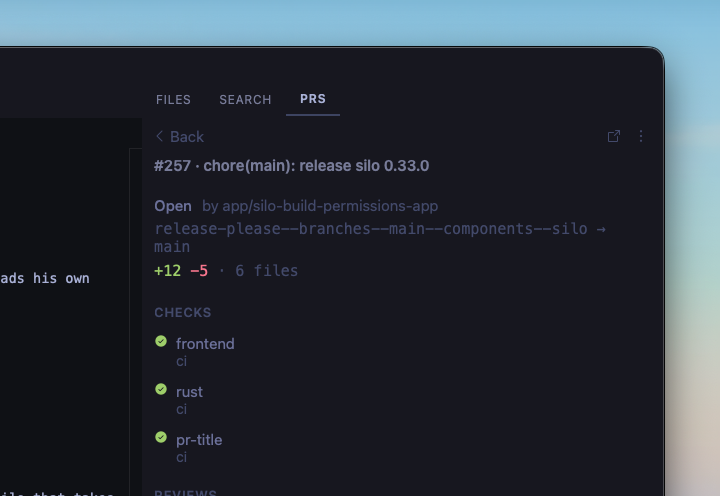
What you get
- Side panel listing PRs for every unique GitHub remote in the active workspace (worktrees of the same repo collapse into one list)
- Filters: My PRs (default), Needs my review, All open, Recently merged
- Click a row for CI checks, reviews, description, and activity — failing and still-running checks stay visible, and at least 5 checks always show even when everything's green; the rest collapse behind a "Show N more passing" toggle so a PR with dozens of checks doesn't bury what actually needs a look
- Drill from a PR into its commits, then a commit's changed files, then open a file's diff — sourced from GitHub directly, so it works even for commits never fetched into your local clone (e.g. a fork PR's head)
- Or drill straight into every file the PR changes overall (diffed against its merge-base, matching GitHub's own "Files changed" tab) without stepping through individual commits
- Every review is listed, not just each reviewer's latest — a reviewer can leave several (e.g. commented, then had it auto-dismissed by a later push), and each one is its own clickable row. Click through to read the full write-up on its own page, not just the state icon, including its inline (file/line) conversations shown as full threads — every reply in order, regardless of which review each individual reply happens to be attributed to — which often carry the actual feedback when a review's own summary is empty
- Descriptions and review bodies render embedded raw HTML too (common in bot-generated reviews, e.g. Cursor Bugbot's
<picture>/<details>output), sanitized so untrusted PR content can never execute script or inject an unsafe link - Merge from the detail view when the PR is merge-ready (disabled with a reason otherwise)
- At-a-glance review icons, check rollup, draft and conflict chips
- Copy PR URL, head branch, or
gh pr checkout N - Configurable polling for active and background workspaces
Requirements
Install the gh CLI and run gh auth login.
Installing
From a GitHub Release
- Go to Releases.
- Right-click the
.tgzasset → Copy link address. - In Silo: Settings → Extensions, paste the URL and click Install.
From source
git clone https://github.com/silo-code/silo-extensions
cd silo-extensions/github-prs
npm install
npm run build
Then in Silo: Settings → Extensions → Install from folder, point at this directory.
Usage
Open the PRS panel on the right. The default filter is My PRs. Switch filters from the header menu; Recently merged fetches on demand.
Click a row for details. List data shows immediately; description and activity load next. Use Merge on the detail header when the PR is ready (confirm first). Use the overflow menu to copy the URL, branch name, or checkout command.
From the detail view, open Commits to see the PR's own commit history, click a commit for its changed files, then click a file to open its diff. Or open Files changed to go straight to every file the PR touches overall. Click a review under Reviews to read its full body.
If monitoring was turned off for a workspace, use Enable in the panel gate to turn it back on.
Settings
Open Settings → GitHub Pull Requests:
| Setting | Default | Description |
|---|---|---|
| Active workspace interval | 1 minute | How often to poll the active workspace |
| Inactive workspace interval | 10 minutes | How often to poll background workspaces |
Permissions
Declared in package.json under silo.permissions:
process— rungh/gitto resolve remotes, list pull requests, and check authentication
Building
npm install
npm run build        # one-shot
npm run build:watch  # watch mode
Versions
| Version | Published | Permissions | Build | sha256 |
|---|---|---|---|---|
| v0.1.17 | 2026-08-31 | process | — | 5c230d5ce3ab… |
| v0.1.16 | 2026-08-27 | process | — | e09d2aaf8851… |
| v0.1.15 permissions widened | 2026-08-25 | process | — | b3d3682f3579… |
| v0.1.14 | 2026-08-21 | none | — | 824c76ec74e1… |
| v0.1.13 | 2026-08-06 | none | — | eaa900356dfc… |
| v0.1.12 | 2026-08-02 | none | — | e44b8c61b2b7… |
| v0.1.11 | 2026-08-01 | none | — | 5520e82c7b13… |
| v0.1.10 | 2026-08-01 | none | — | 9ccae2fe5c4c… |
| v0.1.9 | 2026-07-27 | none | — | 79ff24f4bcf6… |
| v0.1.8 | 2026-07-25 | process | — | dbf4114bf48b… |
| v0.1.7 | 2026-07-25 | process | — | a6b4a2c564a2… |
| v0.1.6 | 2026-07-21 | process | — | 6c2f022f6d82… |
| v0.1.5 | 2026-07-19 | process | — | be11bb08ca4f… |
| v0.1.4 | 2026-07-18 | process | — | 8dba58c83f10… |
| v0.1.3 | 2026-07-18 | process | — | 41ce0a3f3cf7… |
| v0.1.2 | 2026-07-18 | process | — | 4c949744b044… |
| v0.1.1 | 2026-07-17 | process | — | b719be119349… |