
GitHub Actions
silo.github-actions
Monitor GitHub Actions workflow runs across workspace repos — status bar, workspace badges, and failure notifications.
GitHub Actions
A Silo extension that surfaces GitHub Actions workflow status directly in your editor — across every open workspace, without leaving your code.
What you get
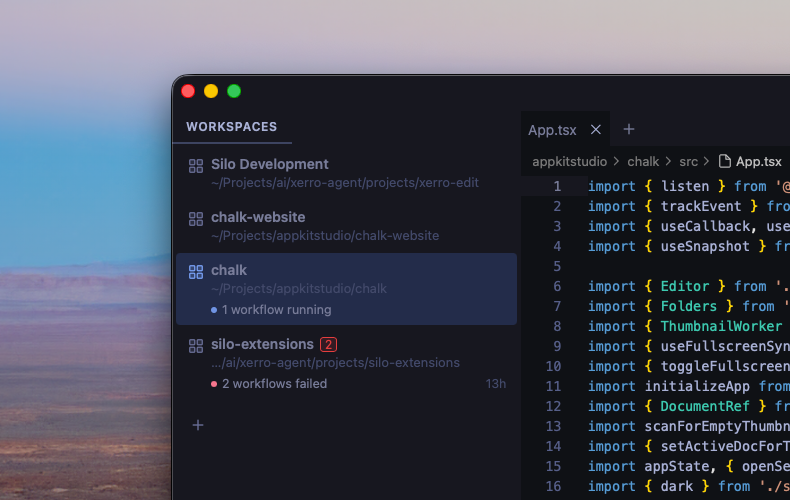
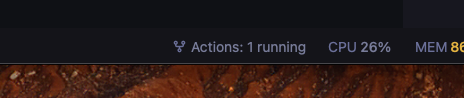
- Status bar item — live count of failing and running workflows for the active workspace, always visible at the bottom of the window
- Workspace badges and decorations — failure counts and status labels appear next to each workspace in the sidebar so you can spot problems at a glance
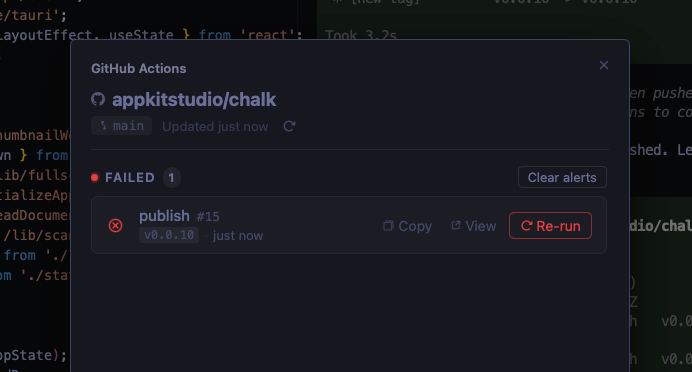
- Workflow modal — click the status bar item to open a full list of failing and running runs, with one-click re-run of a workflow and links to GitHub
- Failure notifications — desktop alerts when a new failure is detected in any open workspace
- Per-workspace branch filter — optionally restrict monitoring to only the checked-out branches for each workspace independently
- Configurable polling — separate intervals for the active workspace and background workspaces
Screenshots
Status bar
Workflow modal
Requirements
This extension uses the gh CLI to authenticate and fetch workflow data. Install it and run gh auth login before installing the extension.
Installing
From a GitHub Release
- Go to Releases.
- Right-click the
.tgzasset → Copy link address. - In Silo: Settings → Extensions, paste the URL and click Install.
From source
git clone https://github.com/silo-code/silo-extensions
cd silo-extensions/github-actions
npm install
npm run build
Then in Silo: Settings → Extensions → Install from folder, point at this directory.
Usage
Once installed and authenticated, the extension starts polling automatically. A status bar item appears at the bottom right showing the state of the active workspace's repo:
| Label | Meaning |
|---|---|
Actions: ok |
All workflows passing |
Actions: 2 failed |
Two distinct workflows have recent failures |
Actions: 3 running |
Three runs in progress |
Actions: Auth failed |
gh auth login required |
Actions: cli missing |
gh CLI not installed |
Click the status bar item to open the workflow modal for the active workspace. From there you can refresh, re-run failed jobs, copy run URLs, and open runs on GitHub.
Branch filter
Each workspace has its own Only monitor checked-out branches toggle at the bottom of the modal. When enabled, only runs on branches currently checked out in that workspace's folders (including worktrees) are shown — runs on other branches are filtered out. Multiple worktrees of the same remote collapse into one repo section. The setting persists per workspace across restarts. Other workspaces are unaffected.
Settings
Open Settings → GitHub Actions to configure:
| Setting | Default | Description |
|---|---|---|
| Active workspace interval | 1 minute | How often to poll the active workspace |
| Inactive workspace interval | 10 minutes | How often to poll background workspaces |
Permissions
Declared in package.json under silo.permissions:
process— rungh apito fetch workflow runs (and trigger re-runs) andgh auth statusto check authentication
Building
npm install
npm run build        # one-shot
npm run build:watch  # watch mode
Versions
| Version | Published | Permissions | Build | sha256 |
|---|---|---|---|---|
| v0.1.21 | 2026-08-27 | process | — | 09385864a1e7… |
| v0.1.20 | 2026-08-21 | process | — | a2432721954a… |
| v0.1.19 | 2026-07-31 | process | — | 1c13b62c0e0d… |
| v0.1.18 | 2026-07-25 | process | — | 0f0bc8d804ec… |
| v0.1.17 | 2026-07-21 | process | — | c5940d3d0de7… |
| v0.1.16 | 2026-07-19 | process | — | f467977beff1… |
| v0.1.15 | 2026-07-19 | process | — | f8ae805ba00f… |
| v0.1.14 | 2026-07-18 | process | — | 258502c560a0… |
| v0.1.13 | 2026-07-17 | process | — | 257b940b25dc… |
| v0.1.12 | 2026-07-17 | process | — | 7a8724af42ac… |
| v0.1.11 | 2026-07-17 | process | — | 7415ac88f0cc… |
| v0.1.10 | 2026-07-16 | process | — | 1fe436376ba1… |
| v0.1.9 | 2026-07-02 | process | — | fe1d95981f2f… |
| v0.1.8 | 2026-07-01 | process | — | 86059d2e45b4… |
| v0.1.7 | 2026-07-01 | process | — | 711be35b3508… |
| v0.1.6 | 2026-07-01 | process | — | f45cf610fe9a… |
| v0.1.5 | 2026-06-30 | process | — | 130abc86bc46… |
| v0.1.4 | 2026-06-30 | process | — | a30f99cf2fd5… |
| v0.1.3 | 2026-06-30 | process | — | 4a4c8efc4c16… |
| v0.1.2 | 2026-06-30 | process | — | 486f6e9bb22d… |
| v0.1.1 | 2026-06-30 | process | — | bd1a9fbe3ede… |